Should You Put a Soft Clipper on Your Master?
When a clipper earns its place on a master, how it differs from a limiter, how much is safe, and why clipping complicates true peak.

No, you should not always put a soft clipper on your master. A clipper earns its place when transients are eating headroom that the rest of the track needs, which is common in rap and trap where the kick and 808 dominate. On a track with gentle dynamics it adds distortion for no benefit. Use a clipper to shave peaks before a limiter, not instead of one.
Disclosure: we make audio plugins. One of ours is mentioned near the end, clearly labeled with its price, and every technique here works with stock tools. No affiliate links.
Get VEIL free
Our de-esser for rap vocals. Free, keyless, no account. Enter an email and the download appears right here.
A copy goes to your inbox. Unsubscribe anytime.
VEIL is yours. Pick your build.
What a Clipper Actually Does
A clipper sets a ceiling and removes anything above it. There is no attack time, no release time and no gain reduction envelope. The waveform simply stops at the threshold.
Hard clipping flattens the peak against a straight edge. Soft clipping curves into the ceiling, so the transition is gradual and the harmonic content generated is less severe. Both are distortion. The distinction is how abruptly the distortion arrives.
Because clipping happens instantaneously, it removes peaks without the level pumping that a compressor or limiter produces. That is the entire appeal: you get headroom back and the groove does not move.
How Is a Clipper Different From a Limiter?
| Property | Clipper | Limiter |
|---|---|---|
| Mechanism | Removes waveform above a ceiling | Turns the signal down when it approaches a ceiling |
| Timing | Instant, no envelope | Attack and release, often with lookahead |
| Artefact | Harmonic distortion | Pumping, and dulled transients |
| Best on | Short sharp peaks: kick, snare, 808 attack | Sustained material and overall level control |
| Latency | Usually none | Often several milliseconds from lookahead |
A limiter that has to catch a 6 dB transient will duck the whole mix around it, and you hear that as the track breathing in and out. A clipper takes the same 6 dB off the top of one drum hit and leaves everything else untouched. On dense rap production this is usually the better trade, which is why clipping became standard in that genre before it did elsewhere.
When Should You Use a Clipper on a Master?
- Drums dominate the peak meter. If the loudest moments in your track are all kick and snare transients, a clipper recovers headroom cheaply.
- The limiter is working too hard. More than roughly 3 dB of consistent limiting means the limiter is doing structural work it is not suited to. A clipper before it reduces that load.
- The track feels dull after limiting. Usually the limiter is flattening transients. Clipping first means the limiter has less to catch.
- You need competitive loudness in a dense genre. Trap, drill and modern hip-hop masters commonly use a clipper to reach target loudness while keeping the drums punchy.
When Should You Not Use a Clipper?
- Sparse or acoustic material. Clipping a solo piano or an acoustic ballad audibly damages it long before it helps.
- The mix is not finished. A clipper cannot fix a kick that is too loud relative to everything else. That is a fader problem.
- You are already happy with the loudness. Adding distortion to a master that does not need level is a pure loss.
- You are tracking or still arranging. Master-bus processing decisions belong at the end.
Where Does a Clipper Go in the Master Chain?
Clipper before limiter. Almost always.
The clipper's job is to remove the isolated peaks that would otherwise force the limiter into heavy gain reduction. Once those are gone, the limiter handles overall level with far less work and far fewer artefacts.
A workable master chain order:
- Corrective EQ
- Compression for glue, 1 to 2 dB at most
- Saturation if the mix wants cohesion
- Clipper, shaving 1 to 3 dB off the sharpest transients
- Limiter, catching what is left and setting the final ceiling
- Metering
Putting a limiter first defeats the purpose: it will already have squashed the transients the clipper was meant to handle, so the clipper has nothing useful to do.
How Much Clipping Is Safe?
Start at 1 dB of clipping and work up while listening for the failure modes rather than watching the meter.
1 to 2 dB is usually inaudible on dense material and recovers meaningful headroom. This is the safe zone.
2 to 4 dB is where genre expectation lives for trap and drill. Audible as a slight hardening of the drums, which many producers want.
Beyond 4 dB you are making a stylistic choice, not a technical one. It can work, but check on multiple systems first.
The failure modes to listen for, in the order they appear: the kick loses its click, cymbals start to sound gritty, sustained bass develops a buzz, and finally the whole mix flattens. Ian Shepherd has written extensively on judging this by ear rather than by meter, and Bob Katz covers the consequences of hard clipping in mastering practice.
Level Matching, Because Louder Always Wins
Clipping raises loudness. Any comparison you make without matching levels will favour the clipped version regardless of whether it sounds better, because human hearing rates louder as better in a direct A/B.
Match the bypassed and engaged output before deciding anything. Most clippers include an output trim for exactly this reason. If your clipper does not, put a gain plugin after it and compensate manually. This one habit changes more mastering decisions than any plugin choice.
True Peak, and Why Clipping Complicates It
A sample peak meter reads the values in the file. A true peak meter estimates what happens between samples, where the reconstructed analog waveform can exceed the highest sample value.
Clipping creates sharp edges, and sharp edges generate intersample peaks. So a track clipped to exactly 0 dBFS can measure above 0 dBTP, and a lossy encoder can then produce audible distortion on playback.
Practical rule: set the final limiter ceiling at −1.0 dBTP and use true peak detection. That leaves room for both intersample peaks and encoder behaviour. Streaming platforms normalise playback loudness, so an extra decibel of ceiling costs nothing in perceived level.
Clipping the Mix Bus Versus Clipping Individual Tracks
Most of the argument about clippers concerns the master. Clipping individual elements is often the better move and gets discussed far less.
On the kick and snare. A drum transient is where clipping is least audible and most useful, because the ear is poor at hearing distortion during a very short loud event. Two or three decibels off a kick peak on its own channel means the master clipper has almost nothing left to do.
On the 808. Clipping an 808 slightly generates harmonics that help it read on small speakers, which is the same mechanism that makes saturation useful on sub bass. Watch for the note tails buzzing.
On the vocal bus. Light clipping catches the plosives and hard consonants that push a limiter around. Use sparingly, because sustained vocal material shows distortion far more readily than drums do.
The general principle: distributing 1 dB of peak control across four channels is less audible than taking 4 dB in one place at the end. It also means the master chain is making a smaller, safer decision.
A related habit worth building is checking your work at low volume. Distortion that hides at listening level often becomes obvious quietly, because the ear's frequency response flattens and the midrange stops being masked.
Free and Stock Clipping Options
| DAW | Stock option | Notes |
|---|---|---|
| FL Studio | Fruity Soft Clipper, Fruity Limiter in saturation mode, Maximus | Fruity Soft Clipper is exactly the tool described here and ships with every version |
| Ableton Live | Saturator in Analog Clip mode, Glue Compressor's soft clip switch | The Glue Compressor's clip option is often overlooked |
| Logic Pro | Clip Distortion, Adaptive Limiter | Adaptive Limiter behaves partly like a clipper |
| Pro Tools | Maxim, Lo-Fi | Maxim handles peak control; Lo-Fi provides clipping character |
| Reaper | JS Soft Clipper, ReaLimit | The bundled JS clipper is capable and free |
| Studio One | Limiter with soft clip, RedLightDist | The stock limiter includes a clip stage |
There is no need to buy a clipper. Every DAW in this table ships one, and the differences between them matter far less than where you place it and how hard you drive it. Sound On Sound has published measurement-based comparisons of peak-control tools, and iZotope maintains readable explainers on true peak and intersample behaviour.
From Our Own Line

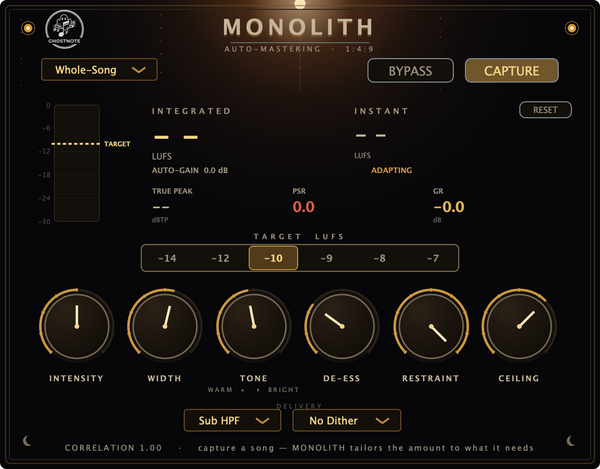
MONOLITH ($29) is our whole-song mastering plugin. You play the track once end to end, it measures with a BS.1770-4 loudness engine, solves one correction and hits your LUFS target with dynamics preserved. It reports integrated LUFS and true peak, which is the measurement half of everything described above. It is not AI, and your audio never leaves your computer.
It runs offline inside your DAW as a one-time purchase, VST3 on macOS and Windows and Audio Unit on macOS. There is a fuller treatment of loudness targets in our loudness guide.
Frequently Asked Questions
Should I always put a soft clipper on my master?
No: a clipper earns its place when sharp transients are eating headroom the rest of the track needs, which is common in rap and trap. On material with gentle dynamics it adds distortion for no benefit. Use it to shave peaks before a limiter, never instead of one.
What is the difference between a clipper and a limiter?
A clipper removes waveform above a ceiling instantly, producing harmonic distortion but no level movement. A limiter turns the signal down as it approaches the ceiling using attack and release, which preserves the waveform but can pump and dull transients.
Should the clipper go before or after the limiter?
Before. The clipper removes isolated peaks so the limiter has far less work to do. Placing the limiter first means it has already squashed the transients the clipper was meant to handle.
How much clipping is too much?
One to two decibels is usually inaudible on dense material. Two to four is normal for trap and drill, and beyond four decibels it becomes a stylistic choice. Listen for the kick losing its click and cymbals turning gritty rather than watching the meter.
What is soft clipping?
Soft clipping curves gradually into the ceiling rather than flattening against it, so the harmonic distortion generated is less severe than hard clipping. Both remove peaks instantly; the difference is how abruptly the distortion arrives.
Why does my clipped master distort on streaming platforms?
Clipping creates sharp edges that generate intersample peaks, so a file measuring 0 dBFS can exceed 0 dBTP once reconstructed, and lossy encoders then distort. Set the final limiter ceiling at −1.0 dBTP with true peak detection.
Take VEIL with you
The de-esser this site was built around. Free, keyless, yours on every machine you own.
A copy goes to your inbox. Unsubscribe anytime.
VEIL is yours. Pick your build.