The Rap Vocal Chain, In Order (With Every Setting)
Every stage of a rap vocal chain in order, with the settings we start from and the reason each processor sits where it does.

Run a rap vocal in this order: subtractive EQ, de-esser, fast compressor, slow compressor, saturation, pitch correction, tonal EQ, then reverb and delay on sends, then the vocal bus into the master. Cleanup comes first because every processor after it reacts to whatever you leave in. Total vocal compression stays between 2 and 6 dB, and the master lands near −10 LUFS under a −1.0 dBTP ceiling.
Disclosure: we make audio plugins. Four of ours appear below (one free), each labeled as ours with its price, plus the bundle they form. No affiliate links, and every stage has a stock-plugin equivalent in a table near the end.
Get VEIL free
Our de-esser for rap vocals. Free, keyless, no account. Enter an email and the download appears right here.
A copy goes to your inbox. Unsubscribe anytime.
VEIL is yours. Pick your build.
The Rap Vocal Chain, In Order
- Subtractive EQ. High-pass 70–120 Hz, then narrow cuts. No boosts yet.
- De-esser. Split at 5.5 kHz, 4–6 dB, before any compression.
- Compression, twice. Fast (1.2 ms, 4:1) for consonants, slow (25 ms, 2.5:1) for phrase level. 2–6 dB total.
- Saturation. Level-matched, on an already-even signal. Second de-ess pass here on bright takes.
- Pitch correction. Retune and amount by style, after cleanup.
- Tonal EQ. Wide bands, Q 0.7–1.0, moves of 1–2 dB.
- Reverb and delay. On sends, pre-delay 20–40 ms, returns filtered.
- Vocal bus, then master. 1–2 dB of glue, then −10 LUFS under a −1.0 dBTP ceiling.
Bobby Owsinski's Mixing Engineer's Handbook is a standard reference on chain order. Stage 5 is the placement engineers argue about.
Stage 0: Gain Staging, Before You Touch a Plugin
Plugin defaults assume a level. A compressor with a −18 dB threshold expects a signal near there, so a vocal peaking at −2 dBFS sits sixteen decibels into the wrong part of every curve in the chain. Trim the clip so the vocal averages around −18 dBFS with peaks between −10 and −6.
Bob Katz, who wrote Mastering Audio, devised the K-System to put monitoring calibration in front of the loudness conversation. Ian Shepherd has documented what happens to a mix squeezed before it is finished. Practical version: level-match before every A/B, because a louder bypass wins by default.
Stage 1: Subtractive EQ, and Where to High-Pass
Stage one removes energy that carries no information: stand rumble, the low-mid build-up from working two inches off the capsule, and any frequency your room rings on. Cut only. Sweep a narrow band at +6 dB until the ugly spot jumps out, flip the gain negative, then widen the Q until the voice sounds like itself minus the problem. Two or three cuts is normal; a sixth points at a room problem EQ will not fix.
| Move | Frequency | Amount | Q or slope | Fixes |
|---|---|---|---|---|
| High-pass | 70–90 Hz deep voice, 100–120 Hz brighter | n/a | 12 or 18 dB/oct | Rumble and plosives |
| Wide cut | 150–300 Hz | −1 to −3 dB | 1.2–2.0 | Proximity boom |
| Wide cut | 300–500 Hz | −1 to −2 dB | 1.5 | Boxiness |
| Narrow cut | 800 Hz–1.5 kHz | −2 to −4 dB | 4–8 | Nasal honk |
| Narrow cut | 2.5–4 kHz | −1 to −3 dB | 6–10 | A harsh peak you hear soloed |
Stage 2: De-Essing, Before the Compressor
A compressor's detector reads an "ss" as a transient and pulls the whole word down with it: the ess still spits, and the vowel behind it dips. No attack setting fixes that, because the ess is the trigger.
Split-band is what keeps de-essing from dulling the voice. VEIL (ours, free) uses an LR4 Linkwitz-Riley crossover and reduces gain on the high band only, so the body of the voice cannot be touched by construction. Our probe suite measured 300 Hz body at −0.00 dB while 4.6 dB of de-essing was active.
Detection compares the HF envelope to the full-band envelope in dB. An "ss" at −9 dBFS and one at −29 dBFS both received exactly 10.0 dB of gain reduction, so a whispered ad-lib and a shouted hook get identical treatment with no threshold riding. Lookahead is 3 ms, and a 30 ms "ts" burst was caught with 8.8 dB of reduction, click-free. The full method is in how to remove sibilance without dulling the vocal.

De-esser · Free forever
Ghostnote VEIL
Split-band by design, so the body of the voice cannot be touched. Our probe measured 300 Hz at −0.00 dB while 4.6 dB of de-essing was working, and an "ss" at −9 and −29 dBFS both got exactly 10.0 dB. The full plugin, free, keyless.
Get VEIL free →| Control | Start at | Notes |
|---|---|---|
| Crossover | 5.5 kHz | 4.5 kHz for deep voices, 8 kHz for bright ones; range 3–10 kHz |
| Sensitivity | Mid dial | Relative threshold −2 to −14 dB, 4 dB soft knee, 1.3 slope |
| Range | 4–6 dB | 1–24 dB available; past 8 dB, check mic distance |
| Attack / release | 1 ms / 20–200 ms | Program-dependent, up to 3× on a sustained "shhh" |
| Listen mode | Removed | Plays only what was taken out: esses, not words |
Stage 3: Compression, and How Much a Rap Vocal Needs
One compressor cannot do both jobs. Consonants move in single-digit milliseconds; phrase level drifts across sixteen bars. Run two in series: a fast peak catcher at three to four decibels of gain reduction, then a slow leveler at one to two.
TALISMAN (ours, $29) is built that way. GRIT is FET-style: instant peak detector, 4 dB knee, program-dependent ratio rise, so sustained input pushes the ratio up; HEX mode takes that to a 0.3 ms attack and ratios up to 16:1. WARMTH is the optical leveler: RMS detector, soft 9 dB knee, low ratios, two-stage program-dependent release. Total gain reduction on rap phrases sits in a 2–6 dB sweet spot; the meter reads full at 12 dB.
Both detectors run through a sidechain high-pass, 80 Hz by default. Open it toward 500 Hz on boomy takes and low energy stops driving the compressor: a 60 Hz tone lost more than 6 dB of detector-driven gain reduction at that setting. That is what keeps the same compressor usable on an 808 bus. Per-style numbers live in vocal compression settings for rap.

Vocal compressor + saturator · $29
Ghostnote TALISMAN
Two compressor stages in series feeding tube-to-tape colour, with a sidechain high-pass that stops 808s from pumping the vocal. Pick a preset and turn DRIVE, or open the panel and drive both stages yourself.
See TALISMAN →| Stage | Threshold | Ratio | Attack | Release | Target GR |
|---|---|---|---|---|---|
| Fast, FET-style | −18 dB | 4:1 | 1.2 ms | 110 ms | 3–4 dB |
| Slow, optical-style | −18 dB | 2.5:1 | 25 ms | 220 ms | 1–2 dB |
Stage 4: Saturation, After the Compressor
Saturation is how a thin vocal sits in a dense beat without going up in level, and it belongs after the compressor because harmonic generation scales with input. Feed it a vocal whose level still swings and the character swings too.
TALISMAN's saturator (ours) morphs from an asymmetric-tanh tube stage (even harmonics) through transformer to a symmetric tape stage (odd harmonics), with the HF roll-off sweeping 20 kHz down to 5.5 kHz toward tape. It runs 4× oversampled, reports 61 samples of latency at 48 kHz, and latency-matches the parallel MIX path, so a parallel blend cannot comb-filter the vocal.
| Control | Setting | Why |
|---|---|---|
| Character | Tube side for modern rap | Even harmonics thicken without the tape-end roll-off |
| Drive | Push until you hear it, then back off 20% | What you notice soloed is too much in the beat |
| Auto level match | On | RMS match, ±12 dB window, 150 ms smoothing: louder cannot read as better |
| TAME de-esser | On for bright takes | 5.5 kHz split, −28 dB, 3.5:1, 1 ms / 50 ms: the second de-ess pass, built in |
| Mix | 100% printed, or 40–60% parallel | Parallel keeps consonant detail while harmonics fill in behind |
Stage 5: Pitch Correction, and Where Autotune Goes in the Chain
Repair goes here, after cleanup. A pitch detector tracks a fundamental, and proximity boom or a spitting ess gives it more to argue with. Compression ahead of it means the engine sees a stable level, so correction stops moving with the delivery. When tuning is the sound (hard-tune as an aesthetic, the artist monitoring through it while tracking), the tuner belongs at the very front, ahead of compression, so performance and effect are one thing. Antares makes Auto-Tune, the trademark most people mean by autotune.
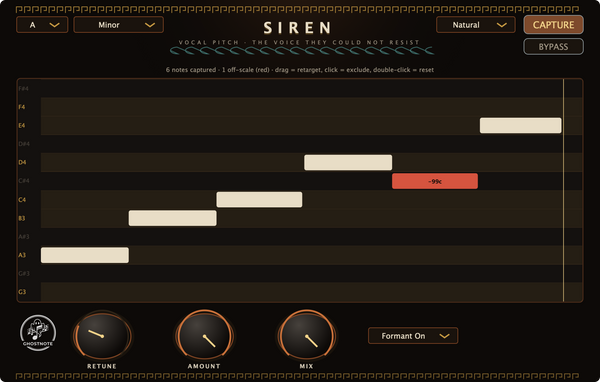
What gets smoothed matters more than the dial number. SIREN (ours, $39) smooths the correction rather than the target, with a time constant from about 2 ms at retune 0% to roughly 500 ms at 100%. A clean note change passes instantly while drift and scoops inside a held note get flattened, which is why it does not slide between words. Detection is YIN with CMNDF across 60–1100 Hz on a 5 ms hop, under 3 cents of error on steady tones, with breaths and silence rejected as unpitched. Correction is TD-PSOLA on one grain schedule shared by both channels, so the two sides of a stereo track stay coherent. Our probes: a 30-cent-flat A3 lands within 5 cents, and an A3 to B3 jump lands 2 cents from B3 within 0.3 s.

Pitch correction · $39
Ghostnote SIREN
A key-aware grid where off-scale notes show as red blocks with cent labels, so you see the problem before you hear it. Retune smooths the correction and not the target, which is why a clean note change still lands instantly.
See SIREN →| Style | Retune | Amount | Formant | What you hear |
|---|---|---|---|---|
| Transparent repair (SIREN "Natural") | 65 | 85 | On | Vibrato survives, flat notes move |
| Melodic rap (SIREN "Rap Melodic") | 8 | 100 | On | Locked but still human, the sung-hook default |
| Pop-tight (SIREN "Tight Pop") | 25 | 100 | On | Clean and forward, some performance sanded off |
| Hard-tune (SIREN "Hard-Tune") | 0 | 100 | On, or off for shifted character | Instant steps between notes |
Formant preservation, on by default, holds the vocal envelope in place, so a corrected note keeps its timbre. Off, the grains get resampled and character shifts with pitch: the deliberate chipmunk or deep-voice move. SIREN reports 2000 samples of latency (about 42 ms at 48 kHz) to the DAW. That figure scales with sample rate, so the delay stays around 42 ms whatever rate you work at. Style-by-style values are in autotune settings for rap.
Stage 6: Tonal EQ, and Where to Boost
Now you boost. Stage 6 decides how present the voice is and how much room it gives the beat. Wide bands, Q 0.7 to 1.0, moves of 1 to 2 dB. Four regions do the work, the same four our mastering plugin measures across a song.
| Region | Move | Amount | What it does |
|---|---|---|---|
| 50–120 Hz | Low shelf down, or leave | 0 to −2 dB | Gives the 808 the whole floor |
| 200–400 Hz | Wide cut | −1 to −2 dB | Clears mud, reads on small speakers |
| 2.5–5 kHz | Wide boost | +1 to +2 dB | Intelligibility, the words land |
| 9–15 kHz | High shelf | +1 to +2 dB | Air; recheck your esses |
Stage 7: Reverb and Delay, on Sends and Not Inserts
Space goes on sends. On an insert, every processor downstream compresses and distorts your tail. High-pass the return at 300–500 Hz so the tail adds no low-mid fog, and low-pass at 6–8 kHz so it adds no brightness you just spent two stages controlling. Pre-delay of 20–40 ms keeps the consonant dry and the tail behind it, so a rap vocal stays intelligible in a big space. Duck the return under the dry vocal, by sidechain if the reverb cannot do it. Valhalla DSP gives away Supermassive; their paid VintageVerb covers plates, rooms and halls.
| Send | Type | Time | Pre-delay | Return filters |
|---|---|---|---|---|
| A | Short room or plate | 0.6–1.2 s | 20–40 ms | HPF 400 Hz, LPF 7 kHz |
| B | Long throw, last word only | 1.8–3 s | 40–60 ms | HPF 500 Hz, LPF 6 kHz |
| C | Slap delay | 60–120 ms, one repeat | n/a | HPF 400 Hz |
| D | Tempo delay, ad-libs | Dotted 1/8, feedback 20–30% | n/a | HPF 500 Hz, LPF 5 kHz |
Stage 8: The Vocal Bus and the Master
The vocal bus is where lead, doubles and ad-libs become one object: light glue only, plus a touch of saturation if the group needs to read as one voice.
Mastering is a whole-song job, and it is where home setups go wrong: measure a loop and your numbers describe the loop. MONOLITH (ours, $29) captures the whole song, then applies one static gain trim and one conservative tonal move. Its loudness engine is full ITU-R BS.1770-4 and EBU R 128, with integrated LUFS accuracy of ±0.03 LU at 44.1, 48 and 96 kHz: asked for −14 LUFS, it measured −13.98. True peak follows BS.1770-4 Annex 2 at 8× oversampling, and across sixteen re-measurements the worst case was −2.26 dBTP against a −1.0 dBTP ceiling. Hand it an already-finished master and it holds back: readiness above 0.8, under 12% of its enhancement applied, under 0.3 dB of EQ, verdict "already well-mastered, light touch".
One lesson from building it: measuring the chain at unity overshot the target by roughly 1.5 dB on hot material, because glue and limiting are level-dependent. Measure near your final operating level. Targets run −14, −12, −10, −9, −8 and −7 LUFS with −10 the default for this genre; choosing one is the subject of how loud should a rap master be. Both Spotify and Apple Digital Masters publish what their platforms do to your file.

Mastering · $29
Ghostnote MONOLITH
Play the song once, end to end, and it hits your LUFS target with the dynamics intact. Asked for −14, our probe measured −13.98. It runs offline with nothing uploaded, and it is not a neural net.
See MONOLITH →| Target | Value |
|---|---|
| Vocal bus glue | 2:1, attack 30 ms, 1–2 dB gain reduction |
| Mix bus before mastering | Peaks −6 to −3 dBFS, nothing clipping |
| Integrated loudness | −10 LUFS starting point for rap |
| True-peak ceiling | −1.0 dBTP, measured at 8× oversampling |
| Low end | Mono below 120 Hz, 24 Hz subsonic high-pass on |
Why Does Vocal Chain Order Matter?
- EQ before de-essing: rumble and boom skew your sense of brightness, so you set the de-esser wrong.
- De-essing before compression: a compressor cannot tell an ess from a snare, so it ducks the word.
- Compression before saturation: harmonics scale with level, so an uneven signal gives uneven character.
- A second de-ess before saturation: saturation multiplies high-frequency energy, so surviving sibilance doubles.
- Pitch after cleanup: detection works on a fundamental, and a stable level means stable correction.
- Tonal EQ after saturation: saturation changes the spectrum, so shape the one you are keeping.
- Space last, on sends: reverb should hear the finished voice, not be processed by it.
- Master the whole song: loudness is a property of an arrangement, not a soloed vocal.
Eight Mistakes That Break the Chain
- Boosting before cutting. A boost on an unfixed resonance makes the resonance louder.
- Compressing first, de-essing second. The words around every ess have already been ducked.
- Tuning a take that needed another pass. A tuner cannot add support, and an unsupported note tuned to center sounds worse than a flat one.
- Ten dB of gain reduction on one compressor. Split it across two and keep the total between 2 and 6 dB.
- Reverb on an insert. Everything downstream is now processing your tail.
- High-passing at 200 Hz because a chart said so. On a baritone that removes chest.
- Two tuners in series. Artifacts stack, and the second tracks the first one's output.
- Never checking mono or a phone speaker. A single small driver is where phase and sibilance problems show up.
The Same Chain With Stock Plugins (Logic, Live, FL Studio, Reaper, Pro Tools)
Every stage above exists in what came in the box; order and gain staging matter more than brand.
| Stage | Logic Pro | Ableton Live | FL Studio | Reaper |
|---|---|---|---|---|
| 1 Subtractive EQ | Channel EQ | EQ Eight | Fruity Parametric EQ 2 | ReaEQ |
| 2 De-ess | DeEsser 2 | Multiband Dynamics, high band | Maximus, high band (by edition) | ReaXcomp, top band |
| 3 Compression ×2 | Compressor: FET model, then Opto | Compressor, then Glue Compressor | Fruity Limiter (comp), then Fruity Compressor | ReaComp twice |
| 4 Saturation | Phat FX or Clip Distortion | Saturator | Soft Clipper or Fruity Waveshaper | Add a free saturator |
| 5 Pitch | Pitch Correction, Flex Pitch offline | Use a free tuner | Pitcher, Newtone offline, by edition | ReaTune |
| 6 Tonal EQ | Channel EQ or Vintage EQ | EQ Eight | Fruity Parametric EQ 2 | ReaEQ |
| 7 Space | ChromaVerb, Delay Designer | Reverb, Delay | Fruity Reeverb 2, Fruity Delay 3 | ReaVerbate, ReaDelay |
| 8 Bus and master | Compressor, Adaptive Limiter, Loudness Meter | Glue Compressor, Limiter | Fruity Limiter, Wave Candy metering | ReaComp, a limiter, JS loudness meter |
Pro Tools covers the same ground with EQ3 7-Band, the stock De-Esser, Dyn3 Compressor/Limiter, AIR Distortion, D-Verb and Maxim. For the thinnest stock areas, pitch and saturation, the free tier is strong: Auburn Sounds gives away a Graillon edition that handles rap tuning, and Tokyo Dawn Records' free Nova will de-ess a take if your stock set has none. A full free chain is in best free VST plugins for rap vocals.
From Our Own Line

The four plugins pictured above are ours, and each has a card beside its stage: the Rap Vocal Chain bundle puts SIREN, TALISMAN and VEIL together at $49 against $68 separately, and MONOLITH covers stage 8. What each one measures is documented on the plugins page.
All of it is VST3 on macOS and Windows plus AU on macOS, keyless, no license server, no machine limit. No fake sales. No intro-price games. The price is the price.
Frequently Asked Questions
What order should a rap vocal chain be in?
Subtractive EQ, de-esser, fast compressor, slow compressor, saturation, pitch correction, tonal EQ, then reverb and delay on sends, then the vocal bus into the master. Every processor reacts to what the one before it left behind, so corrective work goes first and creative work last.
Should the de-esser go before or after the compressor?
Before. A compressor's detector reads an "ss" as a peak and turns the whole word down, which you hear as a dip on the vowel behind the consonant, so de-essing first removes that trigger. Many engineers add a second de-esser before saturation, which multiplies high-frequency energy.
Where does autotune go in the vocal chain?
After corrective EQ and de-essing, so the pitch detector sees a clean fundamental. If tuning is the sound rather than a repair, put it first instead, which is how hard-tuned rap is usually tracked: the artist performs to the tuner. Never run two tuners in series.
How much compression should a rap vocal get?
Two to six decibels of gain reduction in total, split across two compressors: three to four on a fast one (1.2 ms attack, 4:1), then one to two on a slow one (25 ms, 2.5:1). Ten decibels on one compressor flattens the delivery.
Should reverb be on a send or an insert?
A send. On an insert, every processor after it compresses and saturates the reverb tail instead of the voice. A send also lets you high-pass the return around 400 Hz, low-pass around 7 kHz and duck it under the dry vocal.
Do I need paid plugins to build this chain?
No. Every stage maps to stock plugins in Logic, Live, FL Studio, Reaper and Pro Tools, all named above; the two thinnest stock areas are pitch correction and saturation, and both have capable free options. Order matters more than brand.
The other half of Ghostnote
We make apparel for the people who build chains like this one. Same studio, different department.


Take VEIL with you
The de-esser this site was built around. Free, keyless, yours on every machine you own.
A copy goes to your inbox. Unsubscribe anytime.
VEIL is yours. Pick your build.